
View All Blog Posts
February 4, 2026




Modern software development is still largely serial: one task, one branch, one AI assistant, one thing at a time. Even with AI pair programming, most teams are unknowingly applying 1990s workflows to 2025 tools. The result: faster typing, but the same bottlenecks.
The introduction of AI coding assistants promised to revolutionize developer productivity, yet many teams have simply grafted these powerful tools onto fundamentally sequential processes. The constraint is no longer how fast code can be written; it’s how work flows through the system. Understanding the difference between serial and parallel development is essential for teams that want to unlock the full potential of AI-assisted engineering.
The serial development model follows a familiar rhythm. A developer picks a task from the backlog, creates a branch, fires up an AI assistant, and waits for results. Once the AI finishes generating code, the developer reviews the output, makes adjustments, and merges the changes. Only then does the cycle repeat with the next task.
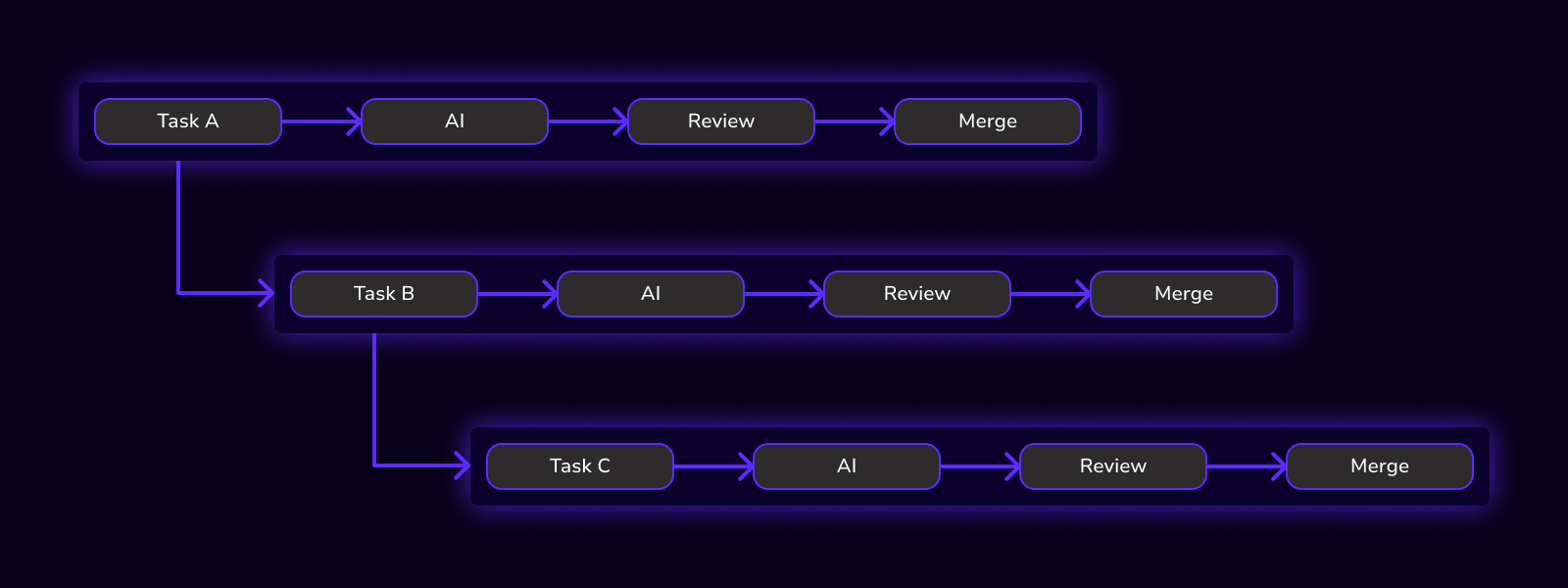
This approach feels natural because it mirrors how developers worked before AI. The problem is that AI has dramatically compressed the code generation phase while leaving everything else untouched. Developers now spend more time waiting for AI output, context-switching between tasks, and sitting in slow feedback loops than actually reviewing or directing work. Research from UC Irvine found that it takes an average of 23 minutes to fully regain focus after an interruption, which means every task switch in a serial workflow carries a substantial cognitive tax. The engineer becomes the throughput bottleneck: AI may generate code faster, but the workflow itself remains stubbornly linear.
Research from METR found that AI coding assistants can actually slow experienced developers down by 19% on certain tasks, largely because the overhead of managing AI interactions within a serial workflow negates the speed gains from automated code generation. The queue of work waiting on work never shrinks.
Parallel development inverts the serial model. Instead of processing tasks one at a time, teams spin up multiple isolated builders, assign each builder a task, and run AI agents simultaneously. Results arrive in parallel, enabling side-by-side review and selective merging.
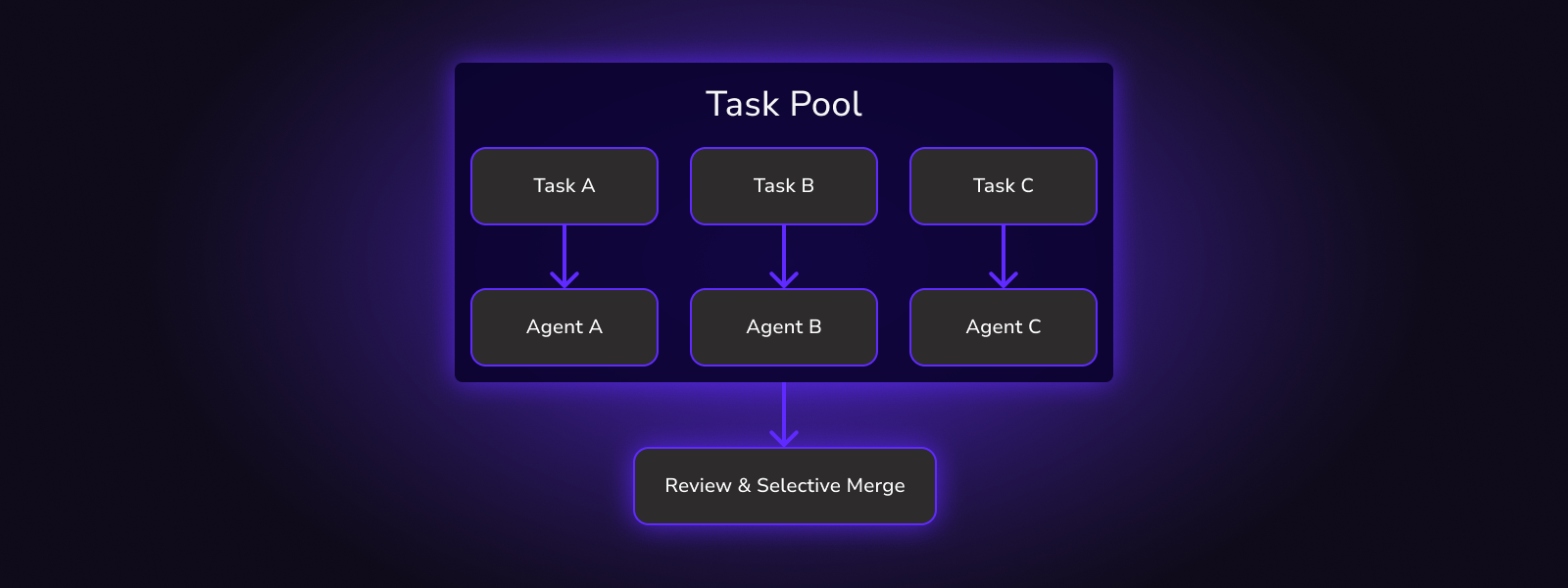
EThe key enabler is isolation. Each builder in DevSwarm runs in its own Git worktree, which means there are no conflicts during generation, diffs remain clean, and no shared state bleeds between tasks. Unlike full repository clones, worktrees share a single Git object database while maintaining completely independent file states, eliminating any possibility of cross-contamination between AI sessions. A developer can have five features progressing at once without any of them interfering with the others. When the AI agents finish, the developer reviews all five outputs and chooses which to merge, reject, or iterate on.
This architecture transforms the developer’s role from sequential task executor to parallel workflow orchestrator. The constraint shifts from “how fast can I complete this task” to “how many tasks can I run concurrently.”
Parallel development doesn’t just save time: it changes how teams think about work. Instead of asking “What should I do next?” teams ask “What should I run in parallel?” This shift in framing unlocks compounding efficiencies that serial workflows cannot achieve.
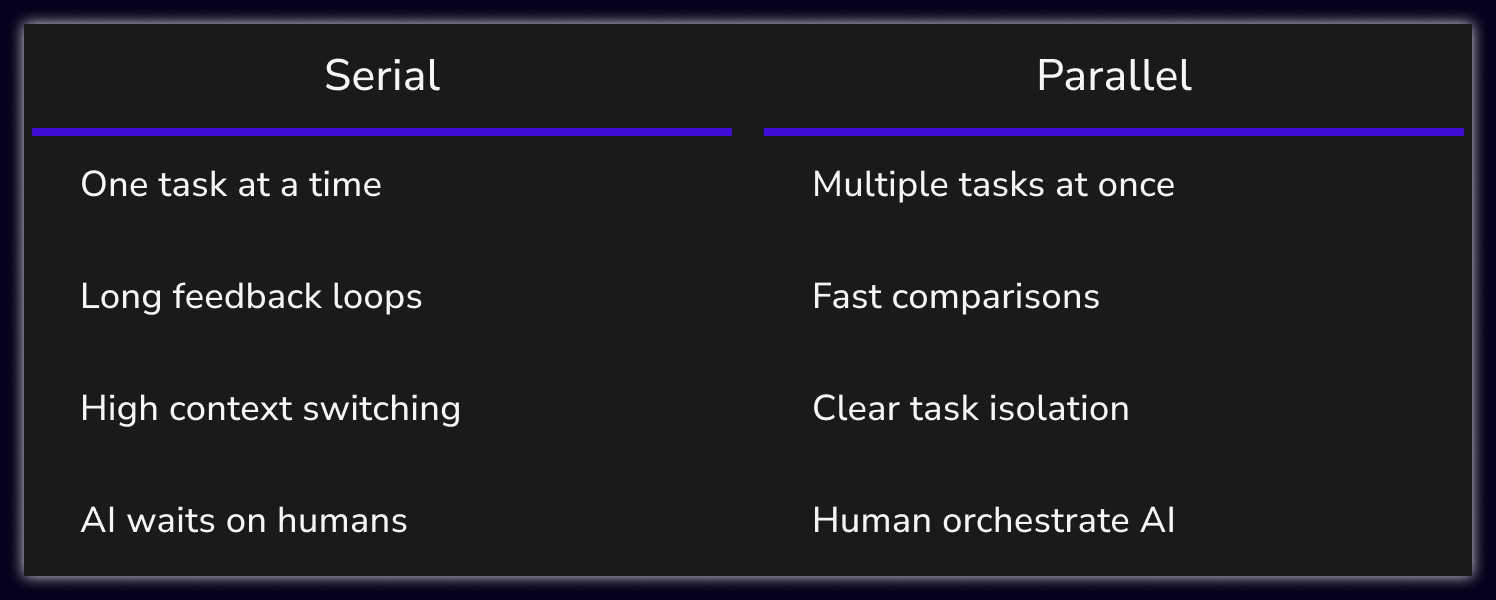
When tasks run concurrently, idle time disappears. The developer who previously waited for AI output on Task A can now monitor Tasks B through E simultaneously. Context switching drops because the mental model shifts from deep focus on a single problem to broad oversight of multiple solutions. Feedback loops tighten because problems surface faster when more experiments run at once.
The organizational implications extend beyond individual productivity. Teams operating in parallel mode can tackle bug backlogs, feature requests, and technical debt simultaneously rather than triaging everything into a single prioritized queue. This is the foundation of high-velocity engineering.
Bug backlogs don’t exist because teams are slow. They exist because bugs are handled serially. AI gives teams a chance to change that, but only if the workflow supports concurrency.
Step 1: Break Bugs Into Independent Units. Parallelization only works when tasks are isolated. Good candidates include UI bugs, validation errors, logging issues, and small backend fixes. Large refactors and cross-cutting architectural changes should remain in the serial queue because they touch too many files and create merge conflicts.
Step 2: Assign One Bug per Builder. Each bug gets its own branch, its own AI agent, and its own context. This prevents cross-contamination between fixes, eliminates conflicting assumptions, and ensures that overlapping changes don’t create integration headaches later.
Step 3: Run AI in Parallel. Instead of waiting for one fix to finish, launch all builders at once. Let the AI agents work concurrently while you monitor progress across the board. This is where time savings compound: five bugs that would take five sequential hours now complete in the time it takes for the slowest one to finish.
Step 4: Review Side-by-Side. Parallel fixes mean parallel review. Compare diffs across all branches, spot inconsistencies between solutions, and reject risky changes before they reach main. Humans stay in control of what gets merged: AI accelerates the generation, not the decision-making.
Teams that adopt this workflow report faster bug throughput, smaller and safer merges, and less engineer fatigue. AI didn’t replace debugging. It removed the waiting.
Every engineering team feels the tension between velocity and stability. Move fast, but don’t break production. AI amplifies both sides of that equation: it can accelerate delivery or accelerate mistakes. The difference comes down to workflow design.
Why Speed Alone Is Dangerous. Fast AI output doesn’t equal safe code. Common failure modes include overconfident merges where developers trust AI output without sufficient review, shallow reviews where the volume of generated code overwhelms the reviewer’s attention, and large diffs that become impossible to verify. Analysis of 1.5 million pull requests found that even a slight increase in the number of files changed can more than double the time-to-merge, indicating higher risks and greater likelihood of failing CI processes. Speed without structure creates risk.
The Safety Myth. Many teams slow down because they believe more checks equal more safety. In reality, safety comes from smaller changes, clear ownership, and better comparisons. Research on pull request size shows that reviewer attention and comprehension drop significantly beyond 200 lines of code, and keeping PRs small leads to substantially fewer post-merge bugs. A 50-line diff is easier to verify than a 500-line diff, regardless of how many approval gates it passes through. Sequential workflows encourage large batches because the overhead of context-switching makes small changes feel expensive. Parallel workflows flip this incentive by making small, scoped changes the natural unit of work.
How Parallelization Improves Both. Parallel workflows enable smaller scoped changes, independent validation, and faster rejection of bad ideas. Instead of betting on one AI-generated solution and hoping it works, teams evaluate many solutions in parallel and choose the best. The isolation provided by Git worktrees means a failed experiment in one builder doesn’t contaminate the others.
The New Equation. Speed plus isolation plus review equals safety. DevSwarm doesn’t ask teams to trust AI blindly. It gives them the tools to orchestrate AI effectively: running multiple experiments, comparing results, and merging only what passes human review. That’s how you move fast and keep production stable.
