
View All Blog Posts
January 15, 2026




DevSwarm 1.2.0 introduces a completely redesigned builder interface that brings together AI terminal sessions, file exploration, and git operations into a single unified view. This release also adds two new AI agents to the DevSwarm ecosystem and includes significant improvements to terminal workflows and file management.
The most visible change in 1.2.0 is the introduction of terminal tabs and split views. Developers can now run multiple AI sessions side-by-side, splitting the workspace horizontally or vertically to compare outputs or work on related tasks simultaneously. Each tab maintains its own isolated context, allowing for parallel exploration of different approaches without interference.
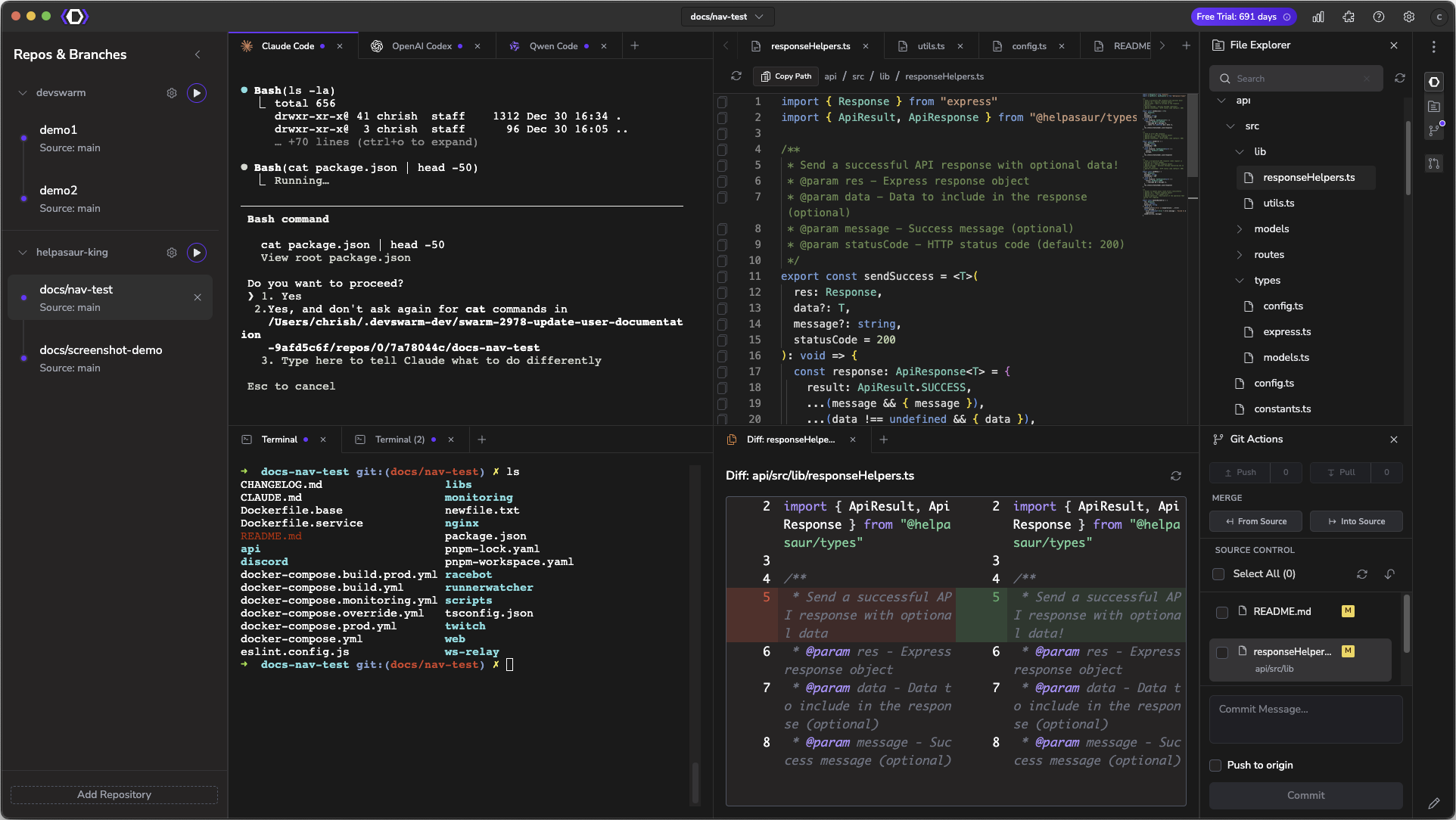
The new Quick Open command (Cmd/Ctrl+P) brings VS Code-style fuzzy search to DevSwarm, enabling instant navigation to any file in the project. This works seamlessly with the integrated widget sidebar, which provides access to File Explorer (Cmd/Ctrl+2), Git Actions (Cmd/Ctrl+3), and Review Mode (Cmd/Ctrl+4) without leaving the builder context. The combination of tabbed terminals and quick file access creates a more fluid workflow for developers managing multiple AI-assisted tasks.
DevSwarm 1.2.0 introduces two additional AI coding assistants to the platform. Auggie CLI from Augment brings context-aware suggestions and code generation capabilities, while Plandex CLI emphasizes planning and architectural reasoning before implementation. Both agents integrate directly into DevSwarm's builder interface, giving teams more options for how they approach AI-assisted development.
On a side note, these two new agents require Node.js 22 or higher. The Settings → System Check page now includes a convenient Install button to help developers upgrade Node.js directly from within the application.
Beyond tabs and splits, the terminal experience includes several quality-of-life improvements. File type icons throughout the explorer and tabs make it easier to identify TypeScript, JavaScript, JSON, Markdown, and other common file types at a glance.
File conflict detection now monitors for changes on disk and prompts developers to reload when files have been modified externally. This prevents the frustrating scenario of accidentally overwriting changes made by other tools or collaborators.
This release addresses several reliability issues that affected previous versions. Branch name validation now warns when creating a builder with a branch name that already exists, while still allowing use of existing git branches. Merge conflict detection has been refined to eliminate false positives that could incorrectly flag clean merges. Remote branch merging issues have been resolved, and the AI agent installation process now correctly respects base installation methods for each agent.
Windows users benefit from improved shell executable resolution in the embedded terminal and enhanced PATH handling for better tool discovery.
Several user-reported issues have been addressed in this release: unexpected back navigation from browser history has been prevented, orphaned UI containers from split tab operations have been fixed, the Add Repository form now populates correctly after directory selection, and the keyboard shortcut is once again displayed properly in the tooltip for builder creation.

