DevSwarm 2.5.0 adds a new chat interface for the terminal coding agents you already use, and brings your VS Code theme across the entire application, with each project carrying its own theme and a broader visual refinement throughout.
A Better Way to Work With Coding Agents
Terminal coding agents are incredibly capable, but they still inherit the limitations of the terminal. Conversations disappear in a wall of text, tool output is difficult to scan, and simple actions like approving permissions interrupt your flow.
DevSwarm 2.5.0 introduces DevSwarm Chat, a dedicated chat interface for the coding agents you already use. It is not another AI assistant. It simply gives your existing agent a better interface. DevSwarm Chat works with your locally installed agents, including Claude, GitHub Copilot, and OpenAI Codex, with support for additional providers coming in future releases.
Responses stream as formatted Markdown instead of plain terminal output. Tool calls appear as organized cards. Permission requests become clickable actions instead of terminal prompts. Your conversations also persist across reloads, so you can leave a workspace and return without losing context.
Your VS Code Theme, Everywhere
Developers spend years refining their editor. The theme they choose becomes part of how they recognize information, navigate projects, and stay focused. Until now, that experience stopped at the editor. Opening DevSwarm meant switching into a completely different visual environment.
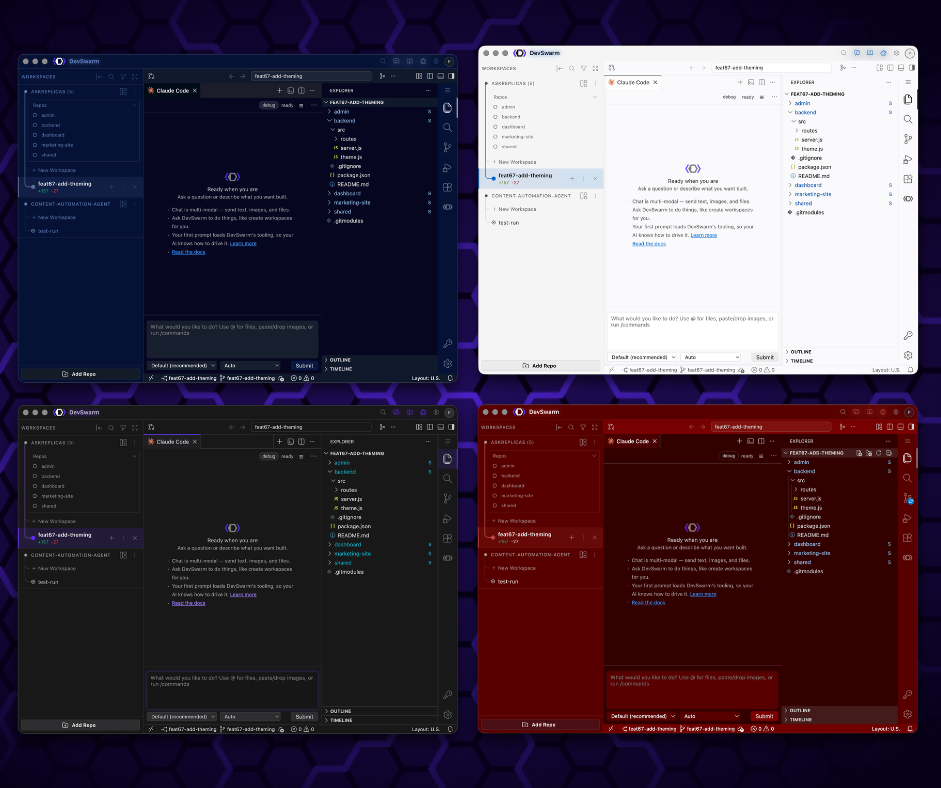
With DevSwarm 2.5.0, your VS Code theme now extends across the entire application. Navigation, workspace management, AI tools, dialogs, settings, and every major interface automatically adopt the same appearance as your editor. The result is simple. DevSwarm feels like a natural extension of your development environment instead of another application with its own design language.
Change Themes the Way You Already Do
There is nothing new to learn. Open the same theme picker you already use, choose any installed VS Code theme, including ones you have added from the marketplace, and DevSwarm updates instantly. Because DevSwarm uses the existing VS Code theme ecosystem, there is no separate theme manager or duplicate configuration to maintain.
Every Project Keeps Its Own Theme
Most developers work across multiple repositories throughout the day. One project might be a production service, another an open source library, and another a personal experiment. Each has its own context.
DevSwarm now remembers the selected theme for every repository, so one project means one theme, and every workspace you open from that repository shares it. When you switch projects, the associated theme switches automatically. Over time, those visual differences become another way to recognize where you are before you even read the repository name.
A Cleaner Interface Across the Board
This release also includes a broader visual refresh throughout DevSwarm. Spacing, typography, and layout have been refined to improve readability and reduce visual clutter. Settings have been reorganized, navigation is easier to scan, and AI Agent management has been simplified so installed agents stay out of the way while important actions receive more emphasis. The goal was not to redesign everything. It was to make everyday workflows feel smoother.
Built Around Developer Flow
Every unnecessary context switch slows you down. Moving between a familiar editor, a different project manager, and an AI workspace forces your brain to constantly readjust. By giving coding agents a modern chat interface and bringing your editor's theme throughout DevSwarm, this release removes another layer of friction from the development workflow. The tools stay the same. The experience becomes more cohesive.
Looking Ahead
This release brings support for the standard VS Code theme ecosystem, and we will continue expanding compatibility over time. High contrast accessibility themes are not fully supported yet because they require additional work to ensure every interface remains readable and consistent. Improving that support is one of our priorities for future releases.
Update to DevSwarm 2.5.0
DevSwarm 2.5.0 makes your AI workspace feel more like the development environment you already know. Open DevSwarm Chat in any workspace, pick your favorite VS Code theme, and continue building in an environment that feels familiar from editor to AI agent.